Introducción
Esta guía te servirá como referencia sobre cómo reemplazar los altavoces del Beats Pill 1.0. Para poder seguir esta guía, tendrás que desmontar parcialmente el Beats Pill. Te recomendamos que consultes nuestra [guía|37438|guía general de desmontaje] para obtener orientación sobre cómo desmontar el Pill. Para esta guía, asumiremos que has desmontado completamente el producto de acuerdo con nuestra guía general de desmontaje.
Qué necesitas
-
-
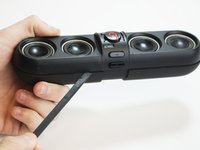
Usando el spudger, crea espacio entre las cubiertas de los altavoces y luego retírelo.
-
En la parte inferior del dispositivo, quita el soporte de goma con el logotipo de BeatsPill.
-
Usando un destornillador Philips #0 que sea seguro para ESD. Quita los cuatro tornillos que estaban debajo del soporte de goma.
-
-
-
Quita los dos tornillos Philips #0 con el destornillador.
-
Quita lentamente la banda central y los dos anillos de clip hasta que el adhesivo se separe. Ponlo a un lado los anillos del clip y la banda central.
-
-
-
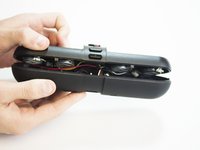
Usa el spudger para separar el dispositivo a lo largo de su costura, comenzando por el medio.
-
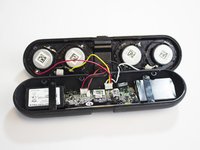
Abre el dispositivo para separar los paneles frontal y posterior.
-
-
-
-
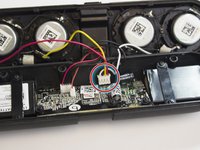
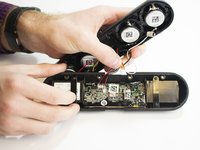
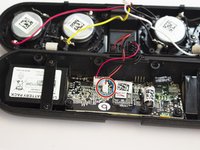
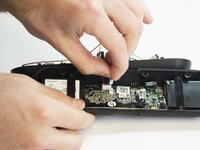
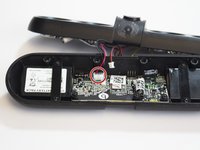
Quita con cuidado los cables amarillo, rojo, negro y blanco de la placa base.
-
-
-
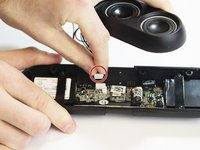
Quita con cuidado los cables negro y rojo del sensor NFC.
-
-
-
Quita con cuidado los cables de control (4 negros, 1 rojo)
-
-
-
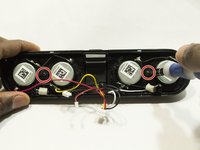
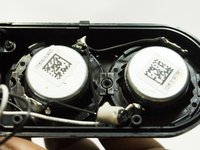
Con el destornillador Phillips #0, desatornilla los dos tornillos que sujetan los altavoces.
-











Para volver a montar tu dispositivo, sigue estas instrucciones en orden inverso.
Para volver a montar tu dispositivo, sigue estas instrucciones en orden inverso.
Cancelar: No complete esta guía.
9 personas más completaron esta guía.
Un agradecimiento especial a estos traductores:
100%

¡ Angel nos está ayudando a reparar el mundo! ¿Quieres contribuir?
Empezar a traducir ›



Equipo

USF Tampa, Team 5-4, Blackwell Fall 2015 Miembro de USF Tampa, Team 5-4, Blackwell Fall 2015
USFT-BLACKWELL-F15S5G4
4 Miembros
13 Guías creadas
10 comentarios
Do you have a link to the speakers that are used for the speaker pill, the current one seems to be broken and I cant find the replacements anywhere
Just wanted to add a comment regarding where to find the actual replacement speakers for the Beats Pill 1.0. I quite certain that the over all size of each individual speaker is 1" including the plastic bezel around the speaker. The actual size of the speaker itself is 3/4" and I believe I have found a replacement speaker to use if one of the speakers in your Beats Pill 1.0 gets blown or damaged. Below is the link to the replacement speaker, found on www.partsexpress.com. It looks almost identical to the stock speaker installed in the Pill 1.0, minus the custom bezel around the speaker that is used to secure the speakers inside the Pill.
http://www.parts-express.com/tymphany-pm...
Buying all 4 speakers at once saves you 75 cent compared to the price of buying just a single speaker.
Hope this helps anyone looking for replacement speakers for their Beats Pill 1.0
I just got all 4 new speakers to replace the older ones as the rubber rims have all soften and sort of disintegrated/damaged. Only problems with the replacement speakers plastic body are not same as original ones. So the speakers won’t fit the 2 clips, so almost no way to secure the speakers. Probably need to be Super glue.
Victor -
I plugged my speaker in because it needed a charge and the metal piece inside the speaker went into it help
