Saltar al contenido principal
Únete a la Comunidad de Reparación - Crear Cuenta

Panasonic Lumix DMC-FX07 Motherboard Replacement

Qué necesitas

  1. Panasonic Lumix DMC-FX07 Motherboard Replacement, Battery: paso 1, imagen 1 de 1
    • Move the switch on the battery door to the Open position.

    • The door will automatically swing open after you let it go.

    Pregunta a FixBot
  2. Panasonic Lumix DMC-FX07 Motherboard Replacement: paso 2, imagen 1 de 2 Panasonic Lumix DMC-FX07 Motherboard Replacement: paso 2, imagen 2 de 2
    • Push the small gray tab on the top right corner to the left. The battery will pop out slightly.

    • Keep your finger clear of the battery when it pops out.

    Pregunta a FixBot
  3. Panasonic Lumix DMC-FX07 Motherboard Replacement, Memory Card: paso 3, imagen 1 de 1
    • Push the memory card in and let go.

    • The memory card will pop out slightly.

    • Pull out the memory card.

    Pregunta a FixBot
  4. Panasonic Lumix DMC-FX07 Motherboard Replacement, Back Cover: paso 4, imagen 1 de 2 Panasonic Lumix DMC-FX07 Motherboard Replacement, Back Cover: paso 4, imagen 2 de 2
    • Unscrew the small screws on the sides of the camera.

    • The screws on the left side(#00P, 4.7mm) are longer than the screw on the right side(#00P, 3.3mm).

    Pregunta a FixBot
  5. Panasonic Lumix DMC-FX07 Motherboard Replacement: paso 5, imagen 1 de 2 Panasonic Lumix DMC-FX07 Motherboard Replacement: paso 5, imagen 2 de 2
    • Unscrew the three small screws on the bottom(#00P, 3.3mm).

    • The bottom will fall off.

    Pregunta a FixBot
  6. Panasonic Lumix DMC-FX07 Motherboard Replacement: paso 6, imagen 1 de 3 Panasonic Lumix DMC-FX07 Motherboard Replacement: paso 6, imagen 2 de 3 Panasonic Lumix DMC-FX07 Motherboard Replacement: paso 6, imagen 3 de 3
    • Lift up the bottom back cover by prying the bottom edge with the spudger.

    • Gently lift up the back cover with your hand from the bottom to the top.

    Pregunta a FixBot
  7. Panasonic Lumix DMC-FX07 Motherboard Replacement: paso 7, imagen 1 de 3 Panasonic Lumix DMC-FX07 Motherboard Replacement: paso 7, imagen 2 de 3 Panasonic Lumix DMC-FX07 Motherboard Replacement: paso 7, imagen 3 de 3
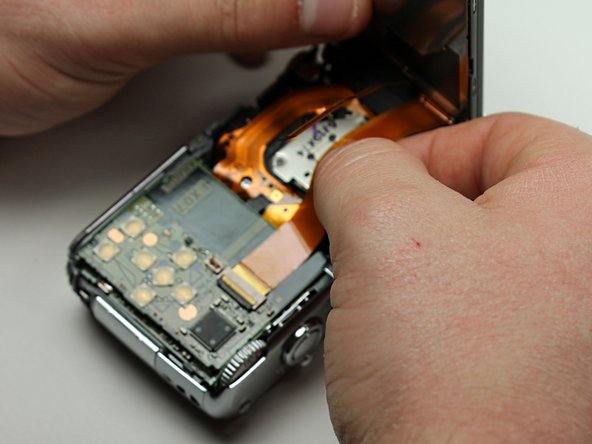
    • Lift the tabs on the ZIF connectors.

    • The ribbon cables should easily come out of the ZIF connectors.

    Pregunta a FixBot
  8. Panasonic Lumix DMC-FX07 Motherboard Replacement, Top Cover: paso 8, imagen 1 de 2 Panasonic Lumix DMC-FX07 Motherboard Replacement, Top Cover: paso 8, imagen 2 de 2
    • Using the spudger, pry off the top cover by gliding the spudger along the entire edge between the top cover and the front cover.

    • Be careful not to damage the cylindrical capacitor on the circuit board under the top cover.

    Pregunta a FixBot
  9. Panasonic Lumix DMC-FX07 Motherboard Replacement, Motherboard: paso 9, imagen 1 de 1
    • Remove the small screw in the hole towards the top of the camera(#00P, 5.4mm).

    Pregunta a FixBot
  10. Panasonic Lumix DMC-FX07 Motherboard Replacement: paso 10, imagen 1 de 2 Panasonic Lumix DMC-FX07 Motherboard Replacement: paso 10, imagen 2 de 2
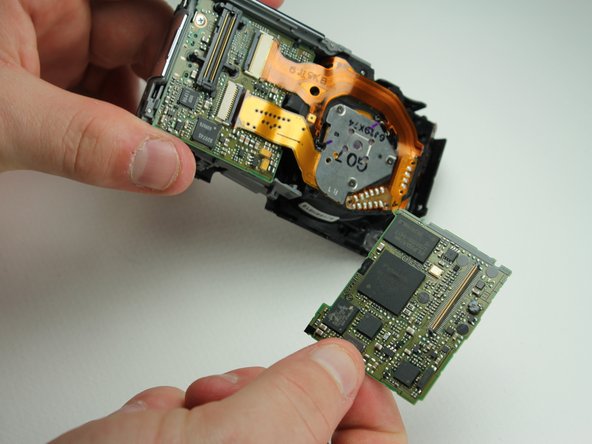
    • Use the spudger to lift up the back logic board.

    • Using your fingers, gently wiggle and pull off the back motherboard.

    • You will hear a click when you lift it up.

    Pregunta a FixBot
  11. Panasonic Lumix DMC-FX07 Motherboard Replacement: paso 11, imagen 1 de 1
    • Remove the small screw holding down the lower motherboard(#00P, 3.2mm).

    Pregunta a FixBot
  12. Panasonic Lumix DMC-FX07 Motherboard Replacement: paso 12, imagen 1 de 3 Panasonic Lumix DMC-FX07 Motherboard Replacement: paso 12, imagen 2 de 3 Panasonic Lumix DMC-FX07 Motherboard Replacement: paso 12, imagen 3 de 3
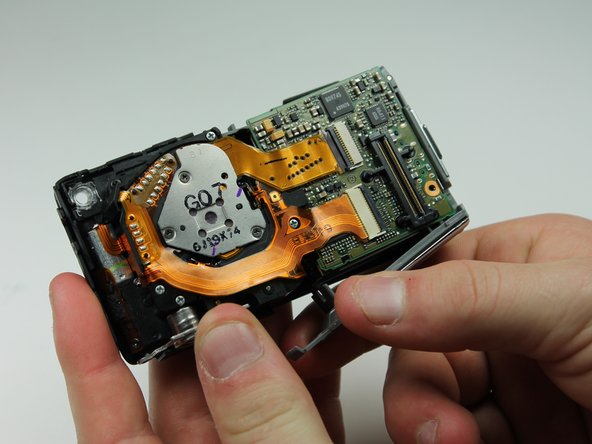
    • Use the spudger to lift the upper tab from the main housing.

    • Gently lift the lower tab from the main body by prying it with your finger.

    • Gently pull off the plastic motherboard housing sideways.

    Pregunta a FixBot
  13. Panasonic Lumix DMC-FX07 Motherboard Replacement: paso 13, imagen 1 de 3 Panasonic Lumix DMC-FX07 Motherboard Replacement: paso 13, imagen 2 de 3 Panasonic Lumix DMC-FX07 Motherboard Replacement: paso 13, imagen 3 de 3
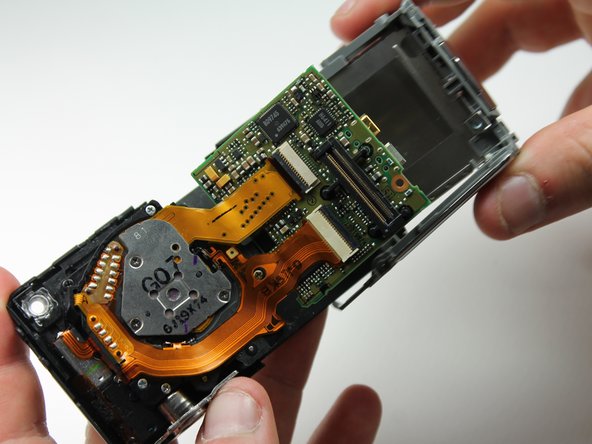
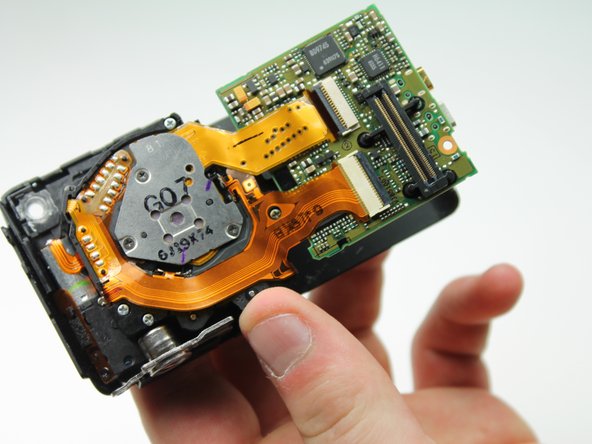
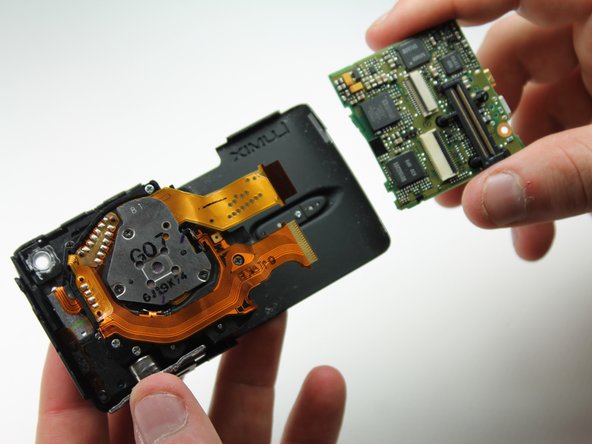
    • Gently lift the tabs on the ZIF connectors connecting the lens to the front motherboard.

    • Once you lift the tabs the ribbons should fall right out and the front motherboard should be free.

    Pregunta a FixBot
Conclusión

To reassemble your device, follow these instructions in reverse order.

Karissa

Miembro Desde 04/13/12

71 Reputación

8 Guías creadas

Equipo

Cal Poly, Team 6-23, Amido Spring 2012 Miembro de Cal Poly, Team 6-23, Amido Spring 2012

CPSU-AMIDO-S12S6G23

Miembros de 4

10 Guías creadas

0Guía Comentarios

Agregar Comentario

Ver Estadísticas:

Ultimas 24 horas: 1

Ultimos 7 días: 9

Ultimos 30 días: 56

Todo El Tiempo: 1,938