
Nexus S Rear Inner Frame Replacement

Última actualización: 4 de sep. de 2013
Vistas: 3.7 k
Ver estadísticas:
- Últimas 24 horas:
- 3
- Últimos 7 días:
- 22
- Últimos 30 días:
- 84
- Todo El Tiempo:
- 3,690
Comentarios: 0
Nadie ha escrito comentarios en esta guía. ¿Quieres escribir el primero?
Ir a los comentarios de la guíaCompletado: 4 5
4 personas han marcado esta guía como "completada". ¿Serás tú la próxima persona en hacerlo?
5 persona acaba de marcar esta guía como "completada". ¡Incluyéndote, excelente trabajo!
Favoritos: 4 5
4 personas han marcado como "Favorita" y se han suscrito a esta guía. ¿Serás tú la próxima persona en hacerlo?
5 personas marcaron como favorita (y se suscribieron) esta guía, ¡incluyéndote a ti!
Guía aportada por comunidad
Un miembro increíble de nuestra comunidad escribió esta guía. No ha sido creada por el personal de iFixit.
Introducción
Ir al paso 1 ↓This guide will help you replace the rear inner framework.
Qué necesitas
Herramientas


-
-
-
Gently insert a plastic opening tool between the rear panel and the inner rear frame near the rear-facing camera.
-
Use your plastic opening tool to pry up the rear case around the perimeter of the Nexus S.
 Pregunta a FixBot
-
-
-
-
-
Using the edge of a plastic opening tool, lift the battery from the end closest to the headphone jack.
-
Remove the battery from the Nexus S.
-
-
-
-
-
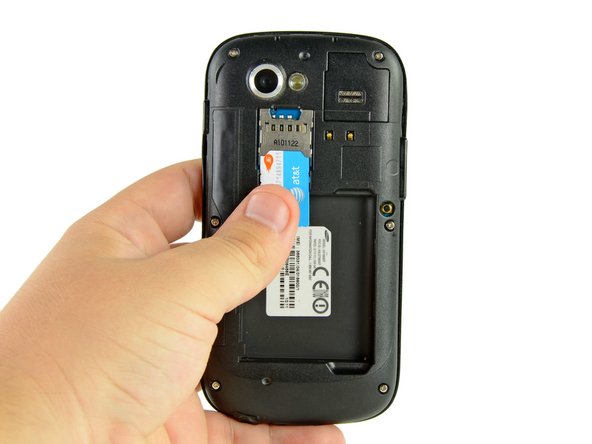
Use your thumb to slide the SIM card downwards from the SIM card slot.
-
Remove the SIM card.
-
-
-
-
-
-
Remove the six Phillips screws securing the rear inner frame to the inner case.
-
-
-
Insert the flat edge of a plastic opening tool in between the rear inner frame and the top left corner of the Nexus S.
-
Pry the opening tool upwards to pop the top right corner from the clips securing it to the inner assembly.
-
-
-
Insert the plastic opening tool to the right of the power button.
-
Slide the plastic opening tool downwards along the perimeter of the Nexus S to release the clips on the right side.
-
-
-
In the same manner as previously described, release the bottom clips located near the bottom of the Nexus S.
-
-
-
Insert and pry the plastic opening tool to release the final clip securing the rear inner frame to the inner assembly.
-
-
-




To reassemble your device, follow these instructions in reverse order.
Cancelar: No complete esta guía.
4 personas más completaron esta guía.

