Saltar al contenido principal
Únete a la Comunidad de Reparación - Crear Cuenta

Minolta QTsi Maxxum Shutter Button Replacement

Qué necesitas

    1. Minolta QTsi Maxxum Shutter Button Replacement, Shutter Button: paso 1, imagen 1 de 1
      • Locate the battery compartment on the bottom panel of the camera.

      • Open the battery door by using a coin.

      • In the counterclockwise direction, twist the coin in the battery door groove to open it.

      Pregunta a FixBot

      Agregar Comentario

    2. Minolta QTsi Maxxum Shutter Button Replacement: paso 2, imagen 1 de 1
      • Two batteries are located inside the battery chamber.

      • Remove the two batteries from the battery chamber by picking them up.

      Pregunta a FixBot

      Agregar Comentario

    3. Minolta QTsi Maxxum Shutter Button Replacement: paso 3, imagen 1 de 1
      • There is a screw located underneath the batteries in the battery compartment.

      • Unscrew and remove the (1) black Phillips #00 5mm screw from the battery compartment.

      • Ensure good lighting before attempting to remove this screw because it is hard to see inside the compartment.

      Pregunta a FixBot

      Agregar Comentario

    4. Minolta QTsi Maxxum Shutter Button Replacement: paso 4, imagen 1 de 1
      • From underneath the flash assembly, remove the (1) black Phillips #00 5mm screw

      • Be careful because you can lose the screw

      Pregunta a FixBot

      Agregar Comentario

    5. Minolta QTsi Maxxum Shutter Button Replacement: paso 5, imagen 1 de 1
      • The only screws remaining that hold the top panel of the camera in place are located next to the view finder.

      • Remove the (2) black Phillips #00 5mm screws from both sides of the view finder.

      • Be careful because you can lose the screw

      Pregunta a FixBot

      Agregar Comentario

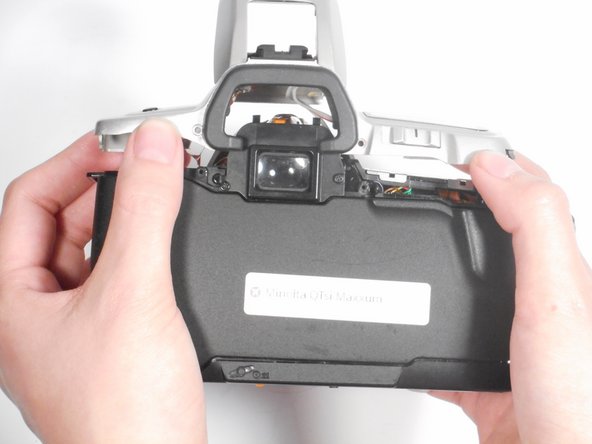
    6. Minolta QTsi Maxxum Shutter Button Replacement: paso 6, imagen 1 de 2 Minolta QTsi Maxxum Shutter Button Replacement: paso 6, imagen 2 de 2
      • The top panel of the camera should now be easy to lift off. If it is not, make sure that all screws and attachments, listed in steps 1-5, have been removed.

      • Once all screws are removed, lift the top panel from the camera.

      • Be careful when removing the top panel because there are wires connected to it.

      Pregunta a FixBot

      Agregar Comentario

    7. Minolta QTsi Maxxum Shutter Button Replacement: paso 7, imagen 1 de 1
      • Use a metal spudger to push the button out of its socket so that you can place a new one in its place.

      Pregunta a FixBot

      Agregar Comentario

Conclusión

To reassemble your device, follow these instructions in reverse order.

Cancelar: No complete esta guía.

Una persona más ha completado esta guía.

Jordan Ellery

Miembro Desde 10/10/16

388 Reputación

3 Guías creadas

Equipo

0Guía Comentarios

Agregar Comentario

Ver Estadísticas:

Ultimas 24 horas: 5

Ultimos 7 días: 32

Ultimos 30 días: 63

Todo El Tiempo: 1,012