Saltar al contenido principal
Únete a la Comunidad de Reparación - Crear Cuenta

Lenovo Ideapad 320-15ABR Screen Replacement

Qué necesitas

  1. Lenovo Ideapad 320-15ABR Screen Replacement, Screen: paso 1, imagen 1 de 3 Lenovo Ideapad 320-15ABR Screen Replacement, Screen: paso 1, imagen 2 de 3 Lenovo Ideapad 320-15ABR Screen Replacement, Screen: paso 1, imagen 3 de 3
    • Begin by prying off the black cover surrounding the screen by wedging the the iFixit opening tool underneath it. Work your way down until you reach the hinge cover.

    • Insert iFixit opening tool in to the hinge cover as pictured and begin slowly prying it off.

    • This will require some force, but take care not to break the hinge cover.

    • Remove the black cover.

    Pregunta a FixBot

    Agregar Comentario

  2. Lenovo Ideapad 320-15ABR Screen Replacement: paso 2, imagen 1 de 3 Lenovo Ideapad 320-15ABR Screen Replacement: paso 2, imagen 2 de 3 Lenovo Ideapad 320-15ABR Screen Replacement: paso 2, imagen 3 de 3
    • Using the Phillips #1 screwdriver, remove the four 3mm screws securing the screen, and put them on the magnetic mat so you will not misplace them.

    • Gently lift the screen out and place it facing down on the keyboard.

    Pregunta a FixBot

    Agregar Comentario

  3. Lenovo Ideapad 320-15ABR Screen Replacement: paso 3, imagen 1 de 3 Lenovo Ideapad 320-15ABR Screen Replacement: paso 3, imagen 2 de 3 Lenovo Ideapad 320-15ABR Screen Replacement: paso 3, imagen 3 de 3
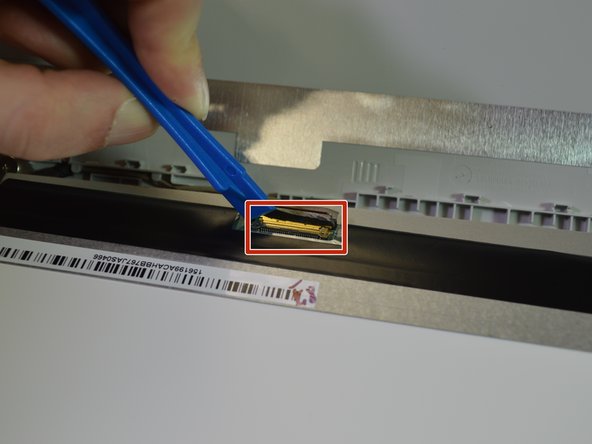
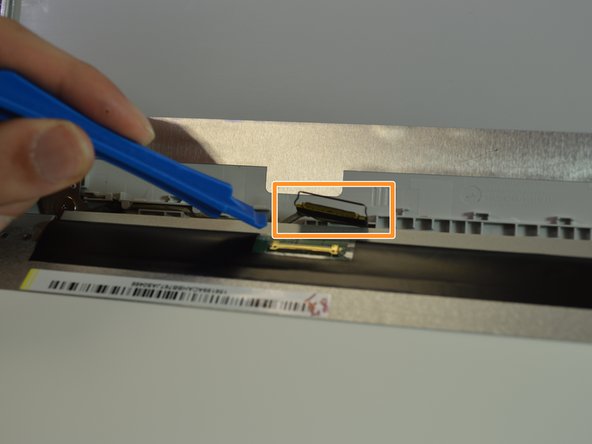
    • Carefully flip the hinge securing the connector up with the opening tool.

    • Slowly work the plug out of the connector.

    • Do not pull by the the cable, as the cable is fragile.

    • Insert the plug from the replacement screen in to the connector. Make sure the connection is secure before flipping the hinge back down.

    Pregunta a FixBot

    Agregar Comentario

Conclusión

To reassemble your device, follow these instructions in reverse order.

Cancelar: No complete esta guía.

3 personas más completaron esta guía.

1Guía Comentario

How to replace hinge for this model

Deepak Singh - Contestar Compartir

Agregar Comentario

Ver Estadísticas:

Ultimas 24 horas: 1

Ultimos 7 días: 16

Ultimos 30 días: 73

Todo El Tiempo: 5,165