Saltar al contenido principal
Únete a la Comunidad de Reparación - Crear Cuenta

IBM Thinkpad T60 Palm Rest Replacement

Qué necesitas

  1. IBM Thinkpad T60 Palm Rest Replacement, Battery: paso 1, imagen 1 de 1
    • Turn the computer over to see the small tab on the battery located near the top of the Thinkpad.

    • Use your finger to slide the tab to the right to unlock the battery.

    Pregunta a FixBot

    Agregar Comentario

  2. IBM Thinkpad T60 Palm Rest Replacement: paso 2, imagen 1 de 2 IBM Thinkpad T60 Palm Rest Replacement: paso 2, imagen 2 de 2
    • Once the tab is in the unlocked position (far right), pull the battery outwards away from the Thinkpad.

    • The battery is now disconnected.

    Pregunta a FixBot

    Agregar Comentario

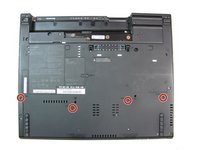
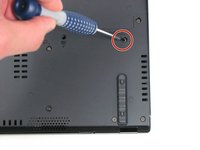
  3. IBM Thinkpad T60 Palm Rest Replacement, Palm Rest: paso 3, imagen 1 de 2 IBM Thinkpad T60 Palm Rest Replacement, Palm Rest: paso 3, imagen 2 de 2
    • Using a #0 Phillips screwdriver, remove the four 17.0 mm screws.

    Pregunta a FixBot

    Agregar Comentario

  4. IBM Thinkpad T60 Palm Rest Replacement: paso 4, imagen 1 de 1
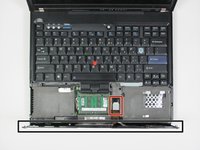
    • Turn the computer back over, so the keyboard is facing upwards.

    • Open the display to access the palm rest. Apply pressure to the sides of the palm rest so that it bends upwards in the middle. Gently lift away from the computer.

    Pregunta a FixBot

    Agregar Comentario

  5. IBM Thinkpad T60 Palm Rest Replacement: paso 5, imagen 1 de 2 IBM Thinkpad T60 Palm Rest Replacement: paso 5, imagen 2 de 2
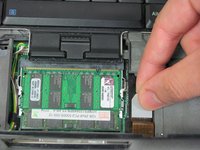
    • Slightly lift the palm rest away from the computer.

    • The touchpad's data cable connects the palm rest to the base unit. BE CAREFUL!

    • Detach the connector by pulling upwards on the white tab.

    Pregunta a FixBot

    Agregar Comentario

Conclusión

To reassemble your device, follow these instructions in reverse order.

Cancelar: No complete esta guía.

5 personas más completaron esta guía.

Equipo

Cal Poly, Team 7-9, Maness Winter 2013 Miembro de Cal Poly, Team 7-9, Maness Winter 2013

CPSU-MANESS-W13S7G9

Miembros de 4

16 Guías creadas

1Guía Comentario

Needs a tutorial on how to install it. I can’t get the palmrest on correctly, I can still lift up on the palmrest and the laptop doesn’t latch properly.

Kyle Gilchrist - Contestar Compartir

Agregar Comentario

Ver Estadísticas:

Ultimas 24 horas: 1

Ultimos 7 días: 6

Ultimos 30 días: 34

Todo El Tiempo: 3,009