Saltar al contenido principal
Únete a la Comunidad de Reparación - Crear Cuenta

Huawei Union Camera Replacement

Qué necesitas

  1. Huawei Union Camera Replacement, Battery: paso 1, imagen 1 de 2 Huawei Union Camera Replacement, Battery: paso 1, imagen 2 de 2
    • Wedge your thumb nail, or the flat end of a spudger, into the bottom left corner and pry off.

    Pregunta a FixBot
  2. Huawei Union Camera Replacement: paso 2, imagen 1 de 2 Huawei Union Camera Replacement: paso 2, imagen 2 de 2
    • Use the flat end of a spudger, or fingernail, to lift up the battery and pull out.

    Pregunta a FixBot
  3. Huawei Union Camera Replacement, Camera Lens Panel: paso 3, imagen 1 de 1
    • Remove the thirteen 3mm Phillips #00 screws from the back panel.

    Pregunta a FixBot
  4. Huawei Union Camera Replacement: paso 4, imagen 1 de 1
    • Use the flat end of a spudger to pry off the back panel.

    Pregunta a FixBot
  5. Huawei Union Camera Replacement, Camera: paso 5, imagen 1 de 2 Huawei Union Camera Replacement, Camera: paso 5, imagen 2 de 2
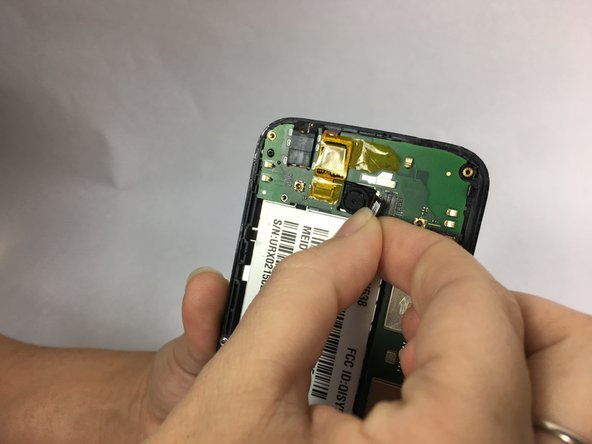
    • Use the flat end of a spudger to disconnect the camera from the motherboard.

    • Pull the camera out to remove.

    Pregunta a FixBot
Conclusión

To reassemble your device, follow these instructions in reverse order.

Equipo

USF Tampa, Team S1-G1, Nance Spring 2018 Miembro de USF Tampa, Team S1-G1, Nance Spring 2018

USFT-NANCE-S18S1G1

Miembros de 4

12 Guías creadas

0Guía Comentarios

Agregar Comentario

Ver Estadísticas:

Ultimas 24 horas: 0

Ultimos 7 días: 8

Ultimos 30 días: 67

Todo El Tiempo: 428