
How to Clean Canon PIXMA MP190 Print Head Nozzle

Última actualización: 8 de ago. de 2019
Vistas: 7.2 k
Ver estadísticas:
- Últimas 24 horas:
- 2
- Últimos 7 días:
- 35
- Últimos 30 días:
- 167
- Todo El Tiempo:
- 7,241
Comentarios: 1
1 comentario sobre la guía.
Ir a los comentarios de la guíaCompletado: 1 2
1 persona ha marcado esta guía como "completada". ¿Serás tú la próxima persona en hacerlo?
2 persona acaba de marcar esta guía como "completada". ¡Incluyéndote, excelente trabajo!
Favoritos: 1 2
1 persona ha marcado como "Favorita" y se ha suscrito a esta guía. ¿Serás tú la próxima persona en hacerlo?
2 personas marcaron como favorita (y se suscribieron) esta guía, ¡incluyéndote a ti!
Introducción
Ir al paso 1 ↓Over time debris can build up on the print head nozzle causing irregular flow resulting in poor print quality.
-
-
-
The printer needs to be on in order to change the ink cartridges.
 Pregunta a FixBot
-
-
-
To locate the ink cartridges the paper output tray must be in the lowered position.
-
Next lift the scanning unit until the scanning support is vertical.
-
Lower the scanning unit until the scanning unit support seats in the scanning unit support slot.
-
-
-
-
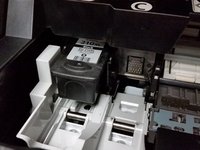
Allow the printer to position the ink cartridge carrier into the ink cartridge removal location.
-
Before replacing the ink cartridge ensure the correct ink cartridge is installed.
-
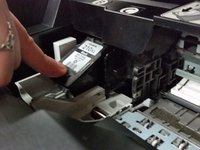
Push down on the front edge of the ink cartridge.
-
Observe the angle at which the ink cartridge is removed.
-
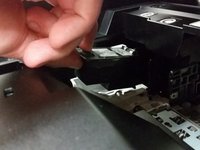
Grasp ink cartridge and pull up and out to remove.
-
-
-
-
-
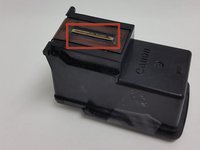
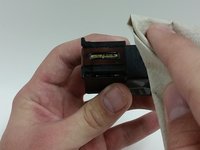
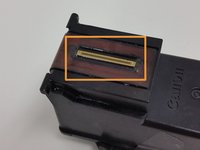
Hold the ink cartridge with the ink nozzle facing up. Using a paper towel firmly wipe the entire ink nozzle.
-
Repeat until the nozzle appears free of any ink and debris.
-
-




To reassemble your device, follow these instructions in reverse order.
Cancelar: No complete esta guía.
Una persona más ha completado esta guía.

Equipo

Michigan Tech, Team 1-5, Lauer Fall 2014 Miembro de Michigan Tech, Team 1-5, Lauer Fall 2014
MTU-LAUER-F14S1G5
Miembros de 3
60 Guías creadas
