Saltar al contenido principal

Envío gratis en pedidos nacionales de $75 o más

HTC Desire 510 Front and Main Cameras Replacement

Vistas: 2.1 k

Ver estadísticas:

Últimas 24 horas:
3
Últimos 7 días:
21
Últimos 30 días:
74
Todo El Tiempo:
2,058
Comentarios: 0

Nadie ha escrito comentarios en esta guía. ¿Quieres escribir el primero?

Ir a los comentarios de la guía
Completado: 2

2 personas han marcado esta guía como "completada". ¿Serás tú la próxima persona en hacerlo?

Favoritos: 3

3 personas han marcado como "Favorita" y se han suscrito a esta guía. ¿Serás tú la próxima persona en hacerlo?

Tiempo Requerido: 10 - 15 minutos
Dificultad: Moderado
Guía aportada por comunidad

Un miembro increíble de nuestra comunidad escribió esta guía. No ha sido creada por el personal de iFixit.

HTC Desire 510 Front and Main Cameras Replacement

Introducción

Ir al paso 1 ↓

HTC Desire 510 / RIO - How to disassemble the device and replace the main or front camera.


Qué necesitas

Herramientas

  • iFixit Opening Tool
    4.8
  • Spudger
    4.9
  • T5 Torx Screwdriver
    4.9
  • Tweezers
    $4.99
    4.9

Resumen del Video

    1. HTC Desire 510 Front and Main Cameras Replacement, BATTERY REMOVAL: paso 1, imagen 1 de 3 HTC Desire 510 Front and Main Cameras Replacement, BATTERY REMOVAL: paso 1, imagen 2 de 3 HTC Desire 510 Front and Main Cameras Replacement, BATTERY REMOVAL: paso 1, imagen 3 de 3
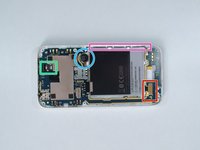
      • Switch off the phone, remove the battery and any installed SIM and memory cards.

      • Remove 7x Torx T5 screws.

      Pregunta a FixBot

      Agregar Comentario

    2. HTC Desire 510 Front and Main Cameras Replacement, REAR BEZEL REMOVAL: paso 2, imagen 1 de 3 HTC Desire 510 Front and Main Cameras Replacement, REAR BEZEL REMOVAL: paso 2, imagen 2 de 3 HTC Desire 510 Front and Main Cameras Replacement, REAR BEZEL REMOVAL: paso 2, imagen 3 de 3
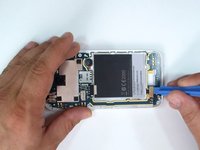
      • Use a plastic tool to remove the rear bezel.

      • The loudspeaker is on the inner side of the rear bezel.

      Pregunta a FixBot

      Agregar Comentario

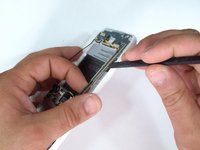
    1. HTC Desire 510 Front and Main Cameras Replacement, FLEX CABLES DISCONNECTING: paso 3, imagen 1 de 3 HTC Desire 510 Front and Main Cameras Replacement, FLEX CABLES DISCONNECTING: paso 3, imagen 2 de 3 HTC Desire 510 Front and Main Cameras Replacement, FLEX CABLES DISCONNECTING: paso 3, imagen 3 de 3
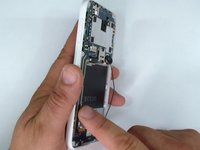
      • Disconnect the touch screen flex cable.

      • Disconnect the light sensor flex cable.

      • Unstuck the vibra-motor from the middle frame.

      • Remove the coaxial antenna cable from the middle frame.

      • The LCD display flex cable is connected to the bottom side of the board.

      Pregunta a FixBot

      Agregar Comentario

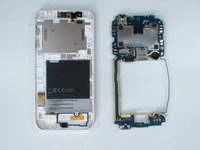
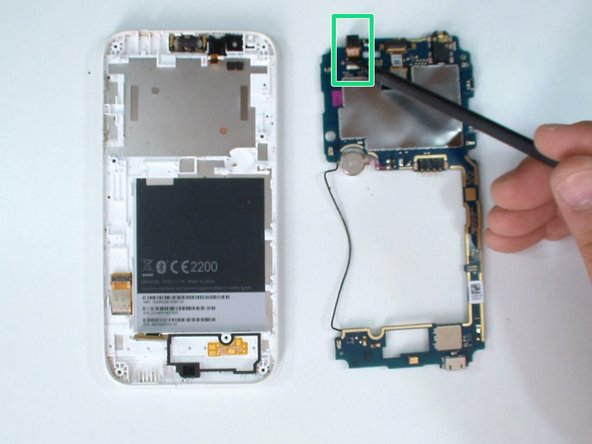
    2. HTC Desire 510 Front and Main Cameras Replacement, LOGIC BOARD REMOVAL: paso 4, imagen 1 de 3 HTC Desire 510 Front and Main Cameras Replacement, LOGIC BOARD REMOVAL: paso 4, imagen 2 de 3 HTC Desire 510 Front and Main Cameras Replacement, LOGIC BOARD REMOVAL: paso 4, imagen 3 de 3
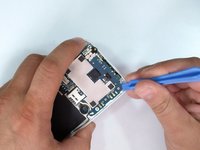
      • At the upper left side, the board is held by a plastic locking clip. Use a plastic tool and start the separating from here.

      • Gently disconnect the LCD display flex cable.

      • Now remove the logic board.

      Pregunta a FixBot

      Agregar Comentario

    1. HTC Desire 510 Front and Main Cameras Replacement, Front and Main Cameras: paso 5, imagen 1 de 2 HTC Desire 510 Front and Main Cameras Replacement, Front and Main Cameras: paso 5, imagen 2 de 2
      • Main / Rear camera.

      • New line.

      Pregunta a FixBot

      Agregar Comentario

Conclusión

To reassemble your device, follow these instructions in reverse order.

Cancelar: No complete esta guía.

2 personas más completaron esta guía.

ZFix

Miembro Desde 12/09/13

197,816 Reputación

330 Guías creadas

Equipo

Master Techs Miembro de Master Techs

Community

Miembros de 337

8,294 Guías creadas

0Guía Comentarios

Agregar Comentario

Ver Estadísticas:

Ultimas 24 horas: 3

Ultimos 7 días: 21

Ultimos 30 días: 74

Todo El Tiempo: 2,058