Saltar al contenido principal
Únete a la Comunidad de Reparación - Crear Cuenta

HP Pavilion x360 14m-cd0005dx Motherboard Replacement

Qué necesitas

  1. HP Pavilion x360 14m-cd0005dx Motherboard Replacement, Back Cover: paso 1, imagen 1 de 1
    • Turn off and shut down the computer.

    • Disconnect the power adapter and all external devices connected to the computer.

    • Do not work with the device powered on. It may result in bodily harm through electric shock.

  2. HP Pavilion x360 14m-cd0005dx Motherboard Replacement: paso 2, imagen 1 de 1
    • Flip the device with the backplate up and with the hinge on the far side.

  3. HP Pavilion x360 14m-cd0005dx Motherboard Replacement: paso 3, imagen 1 de 2 HP Pavilion x360 14m-cd0005dx Motherboard Replacement: paso 3, imagen 2 de 2
    • Use the opening tool to remove the rubber feet attached to the bottom of the device.

  4. HP Pavilion x360 14m-cd0005dx Motherboard Replacement: paso 4, imagen 1 de 2 HP Pavilion x360 14m-cd0005dx Motherboard Replacement: paso 4, imagen 2 de 2
    • Remove all screws located on the bottom of the device:

    • Two Phillips #0 7.0mm screws

    • Three Phillips #00 4.5mm screws

    • Make sure to keep track of all screws removed from the device.

  5. HP Pavilion x360 14m-cd0005dx Motherboard Replacement: paso 5, imagen 1 de 3 HP Pavilion x360 14m-cd0005dx Motherboard Replacement: paso 5, imagen 2 de 3 HP Pavilion x360 14m-cd0005dx Motherboard Replacement: paso 5, imagen 3 de 3
    • Using the opening tool, carefully remove the bottom cover from the device.

  6. HP Pavilion x360 14m-cd0005dx Motherboard Replacement, Battery: paso 6, imagen 1 de 3 HP Pavilion x360 14m-cd0005dx Motherboard Replacement, Battery: paso 6, imagen 2 de 3 HP Pavilion x360 14m-cd0005dx Motherboard Replacement, Battery: paso 6, imagen 3 de 3
    • Use a #00 Phillips screwdriver to remove:

    • Six 2.5 mm screws

  7. HP Pavilion x360 14m-cd0005dx Motherboard Replacement: paso 7, imagen 1 de 2 HP Pavilion x360 14m-cd0005dx Motherboard Replacement: paso 7, imagen 2 de 2
    • Carefully lift from the base and remove the battery.

  8. HP Pavilion x360 14m-cd0005dx Motherboard Replacement, Heat Sink and Fan: paso 8, imagen 1 de 1
    • Remove the tape that secures the fan to the computer.

  9. HP Pavilion x360 14m-cd0005dx Motherboard Replacement: paso 9, imagen 1 de 2 HP Pavilion x360 14m-cd0005dx Motherboard Replacement: paso 9, imagen 2 de 2
    Herramienta utilizada en este paso:
    Tweezers
    $4.99
    • Find the fan cable

    • Use the Reverse Tweezers to unplug the fan cable

  10. HP Pavilion x360 14m-cd0005dx Motherboard Replacement: paso 10, imagen 1 de 3 HP Pavilion x360 14m-cd0005dx Motherboard Replacement: paso 10, imagen 2 de 3 HP Pavilion x360 14m-cd0005dx Motherboard Replacement: paso 10, imagen 3 de 3
    • Remove all screws securing the fan to the device:

    • Two Phillips #00 4.5mm screws

    • Four Phillips #00 4.5mm screws

  11. HP Pavilion x360 14m-cd0005dx Motherboard Replacement: paso 11, imagen 1 de 2 HP Pavilion x360 14m-cd0005dx Motherboard Replacement: paso 11, imagen 2 de 2
    • Lift and remove the fan and heat sink from the device.

    • When removing the fan, there will be an adhesive strip attached to the bottom. There may be some resistance as the device is being removed. Use a spudger to hold the adhesive down during removal.

  12. HP Pavilion x360 14m-cd0005dx Motherboard Replacement, Motherboard: paso 12, imagen 1 de 2 HP Pavilion x360 14m-cd0005dx Motherboard Replacement, Motherboard: paso 12, imagen 2 de 2
    • Remove all screws securing the motherboard to the device:

    • Ten Phillips #0 4.5mm screws

  13. HP Pavilion x360 14m-cd0005dx Motherboard Replacement: paso 13, imagen 1 de 3 HP Pavilion x360 14m-cd0005dx Motherboard Replacement: paso 13, imagen 2 de 3 HP Pavilion x360 14m-cd0005dx Motherboard Replacement: paso 13, imagen 3 de 3
    Herramienta utilizada en este paso:
    Tweezers
    $4.99
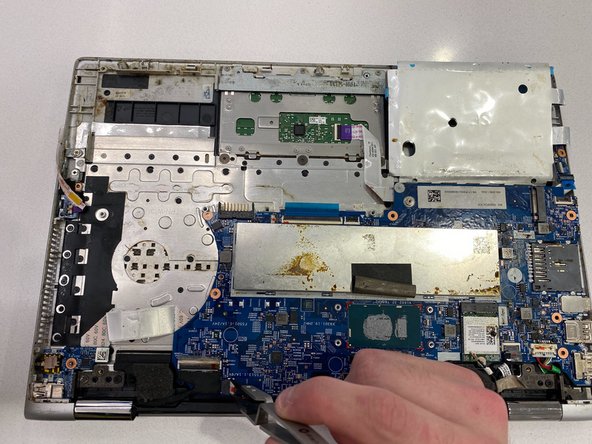
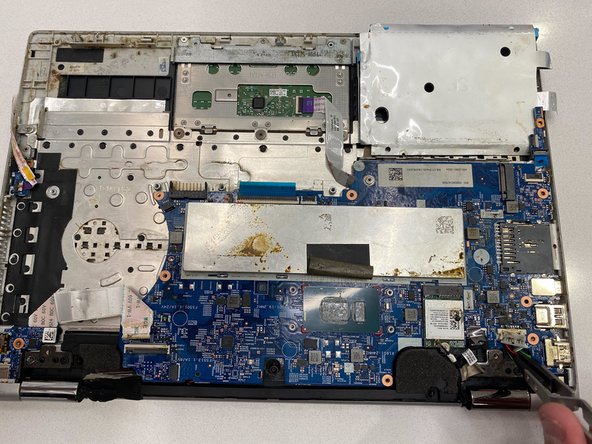
    • Use the Reverse Tweezers to disconnect the speaker cables from the motherboard.

  14. HP Pavilion x360 14m-cd0005dx Motherboard Replacement: paso 14, imagen 1 de 2 HP Pavilion x360 14m-cd0005dx Motherboard Replacement: paso 14, imagen 2 de 2
    • Slide out the ribbon wire from the motherboard

  15. HP Pavilion x360 14m-cd0005dx Motherboard Replacement: paso 15, imagen 1 de 2 HP Pavilion x360 14m-cd0005dx Motherboard Replacement: paso 15, imagen 2 de 2
    • Gently lift the motherboard out of the device

Conclusión

To reassemble your device, follow these instructions in reverse order.

Una persona más ha completado esta guía.

0Guía Comentarios

Agregar Comentario

Ver Estadísticas:

Ultimas 24 horas: 0

Ultimos 7 días: 5

Ultimos 30 días: 37

Todo El Tiempo: 1,004