
HP Pavilion 14-cf0014dx WLAN Card Replacement

Sam Cole y
Última actualización: 17 de ene. de 2025
Vistas: 582
Ver estadísticas:
- Últimas 24 horas:
- 1
- Últimos 7 días:
- 12
- Últimos 30 días:
- 49
- Todo El Tiempo:
- 582
Comentarios: 0
Nadie ha escrito comentarios en esta guía. ¿Quieres escribir el primero?
Ir a los comentarios de la guíaCompletado: 0 1
Nadie ha marcado esta guía como "completada". ¿Quieres marcarla tú?
1 persona acaba de marcar esta guía como "completada". ¡Has sido tú, excelente trabajo!
Favoritos: 0 1
Nadie ha marcado como "Favorita" ni se ha suscrito a esta guía. ¿Quieres hacerlo tú?
1 persona marcó (y se suscribió) a esta guía como favorita, ¡y ese eres tú!
Fotos de acción
Sé un héroe de acción! Esta guía necesita imágenes que demuestren mejor cómo llevar a cabo acciones específicas.
Necesita mejores imágenes
Mejores fotos mejorarán esta guía. Ayuda tomando, editando o subiendo nuevas imágenes!
Error de marcado
Esta guía necesita mejores marcas. Ayuda corrigiendo o haciendo algunas anotaciones de marcado.
Mejor introducción
Mejora esta guía completando o revisando su introducción.
Introducción
Ir al paso 1 ↓Is your device struggling to connect to the Internet? If so, the WLAN card may be faulty and needs to be replaced. Follow the instructions in this guide to remove and replace the WLAN card in the HP Pavilion 14-cf0014dx laptop.
Qué necesitas
Herramientas
-
Spudger4.9


-
-
-
Flip the device over so that the backside is facing you.
-
Remove the rubber feet to expose six screws.
-
Using the Phillips #1 screwdriver, remove six screws securing the back panel to the device.
 Pregunta a FixBot
-
-
-
Insert a plastic opening tool and run it along the edges of the laptop.
-
Remove the back panel from the device.
-
-
-
-
-
Using the Phillips #0 screwdriver, remove the four screws securing the battery in place.
-
-
-
-
-
-
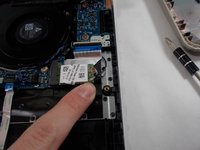
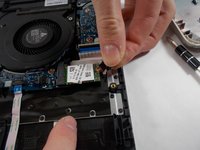
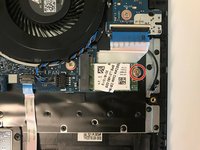
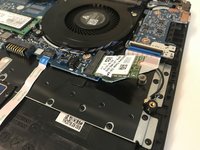
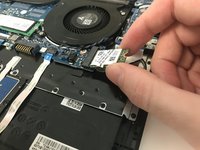
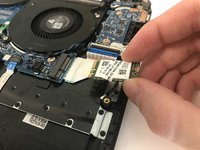
Using the Phillips #0 screwdriver, remove the single screw securing the WLAN card to the motherboard.
-






To reassemble your device, follow these instructions in reverse order.

Equipo

UMass Dartmouth, Team 2-7, Sinclaire Fall 2021 Miembro de UMass Dartmouth, Team 2-7, Sinclaire Fall 2021
UMASSD-SINCLAIRE-F21S2G7
Miembros de 3
84 Guías creadas
