Saltar al contenido principal
Únete a la Comunidad de Reparación - Crear Cuenta

Canon Selphy CP720 Screen Replacement

Qué necesitas

  1. Canon Selphy CP720 Screen Replacement, Screen: paso 1, imagen 1 de 1
    • Remove the three 6mm Phillips #1 screws.

    Pregunta a FixBot

    Agregar Comentario

  2. Canon Selphy CP720 Screen Replacement: paso 2, imagen 1 de 2 Canon Selphy CP720 Screen Replacement: paso 2, imagen 2 de 2
    • Remove the four 8mm Phillips #1 screws, located in each corner of the device.

    Pregunta a FixBot

    Agregar Comentario

  3. Canon Selphy CP720 Screen Replacement: paso 3, imagen 1 de 1
    • Grasp one half of the device's shell in each hand, and pull them apart. They are connected, so don't separate them completely.

    Pregunta a FixBot

    Agregar Comentario

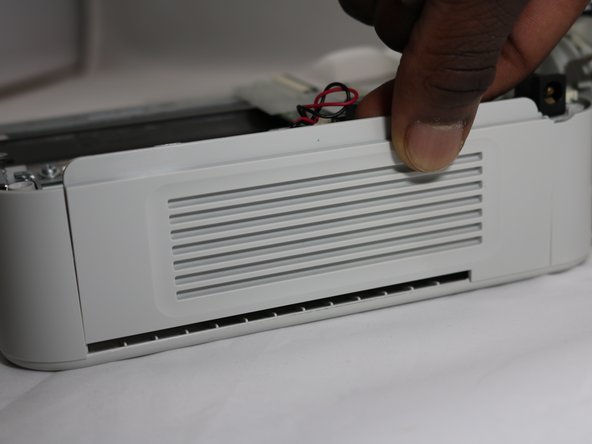
  4. Canon Selphy CP720 Screen Replacement: paso 4, imagen 1 de 2 Canon Selphy CP720 Screen Replacement: paso 4, imagen 2 de 2
    • Lift the side panel off to expose the inside of the printer.

    Pregunta a FixBot

    Agregar Comentario

  5. Canon Selphy CP720 Screen Replacement: paso 5, imagen 1 de 1
    • Remove the four 8mm Phillips #00 screws that hold the upper circuit board to the shell.

    Pregunta a FixBot

    Agregar Comentario

  6. Canon Selphy CP720 Screen Replacement: paso 6, imagen 1 de 1
    • Remove two 8mm Phillips #00 screws from the yellow board.

    Pregunta a FixBot

    Agregar Comentario

  7. Canon Selphy CP720 Screen Replacement: paso 7, imagen 1 de 1
    • Remove the two 8mm Phillips #00 screws from the screen.

    • Lift off the circuit board, yellow board, and screen.

    Pregunta a FixBot

    Agregar Comentario

  8. Canon Selphy CP720 Screen Replacement: paso 8, imagen 1 de 3 Canon Selphy CP720 Screen Replacement: paso 8, imagen 2 de 3 Canon Selphy CP720 Screen Replacement: paso 8, imagen 3 de 3
    • To separate the screen from the circuit board, grasp the data ribbon cable near the base of the black connector on the circuit board and pull parallel to the surface of the board, toward the screen.

    Pregunta a FixBot

    Agregar Comentario

Conclusión

To reassemble your device, follow these instructions in reverse order.

Cancelar: No complete esta guía.

0Guía Comentarios

Agregar Comentario

Ver Estadísticas:

Ultimas 24 horas: 0

Ultimos 7 días: 4

Ultimos 30 días: 43

Todo El Tiempo: 776