Saltar al contenido principal
Únete a la Comunidad de Reparación - Crear Cuenta

Canon Pixma MP480 Motherboard Replacement

Qué necesitas

  1. Canon Pixma MP480 Motherboard Replacement, Rear and Side Panel: paso 1, imagen 1 de 2 Canon Pixma MP480 Motherboard Replacement, Rear and Side Panel: paso 1, imagen 2 de 2
    • Remove the two 7.9 mm screws using a Phillips #1 screwdriver.

    Pregunta a FixBot

    Agregar Comentario

  2. Canon Pixma MP480 Motherboard Replacement: paso 2, imagen 1 de 1
    • Lift up the back cover to remove it.

    • You may need to lift firmly as it requires quite a bit of force.

    Pregunta a FixBot

    Agregar Comentario

  3. Canon Pixma MP480 Motherboard Replacement: paso 3, imagen 1 de 1
    • Open the front tray.

    Pregunta a FixBot

    Agregar Comentario

  4. Canon Pixma MP480 Motherboard Replacement: paso 4, imagen 1 de 2 Canon Pixma MP480 Motherboard Replacement: paso 4, imagen 2 de 2
    • Open the scanner compartment.

    • Make sure the blue lever locks into place to keep the compartment open.

    Pregunta a FixBot

    Agregar Comentario

  5. Canon Pixma MP480 Motherboard Replacement: paso 5, imagen 1 de 2 Canon Pixma MP480 Motherboard Replacement: paso 5, imagen 2 de 2
    • Remove the blue lever from its slot by pushing it back and twisting clockwise.

    • Close the scanner compartment and cover.

    Pregunta a FixBot

    Agregar Comentario

  6. Canon Pixma MP480 Motherboard Replacement: paso 6, imagen 1 de 2 Canon Pixma MP480 Motherboard Replacement: paso 6, imagen 2 de 2
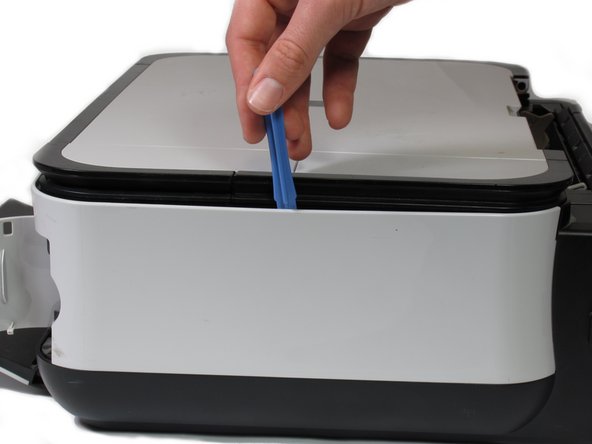
    • Pry open the side cover with the plastic opening tool.

    Pregunta a FixBot

    Agregar Comentario

  7. Canon Pixma MP480 Motherboard Replacement: paso 7, imagen 1 de 2 Canon Pixma MP480 Motherboard Replacement: paso 7, imagen 2 de 2
    • Flip the printer over so that the bottom of the printer is facing you.

    • Use the plastic opening tool to remove the corner of the side panel from the plastic pin.

    Pregunta a FixBot

    Agregar Comentario

  8. Canon Pixma MP480 Motherboard Replacement: paso 8, imagen 1 de 2 Canon Pixma MP480 Motherboard Replacement: paso 8, imagen 2 de 2
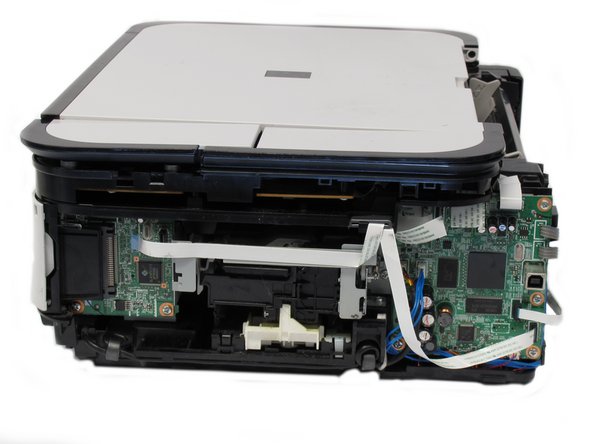
    • Use the plastic opening tool to loosen the side panel from the bottom of the printer.

    Pregunta a FixBot

    Agregar Comentario

  9. Canon Pixma MP480 Motherboard Replacement, Motherboard: paso 9, imagen 1 de 1
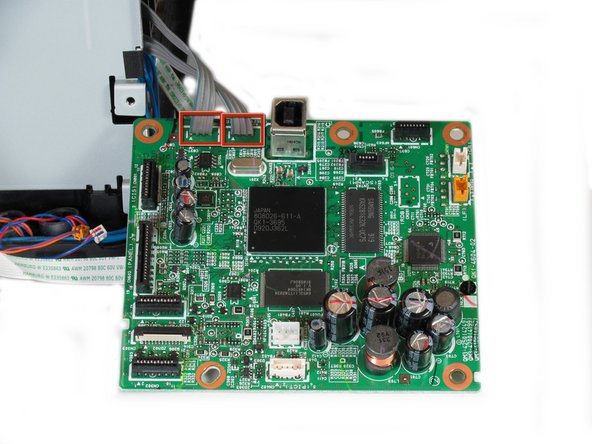
    • Gently pull the 6 ribbon wires out.

    • Gently pull the 4 molded cable assemblies out.

    Pregunta a FixBot

    Agregar Comentario

  10. Canon Pixma MP480 Motherboard Replacement: paso 10, imagen 1 de 2 Canon Pixma MP480 Motherboard Replacement: paso 10, imagen 2 de 2
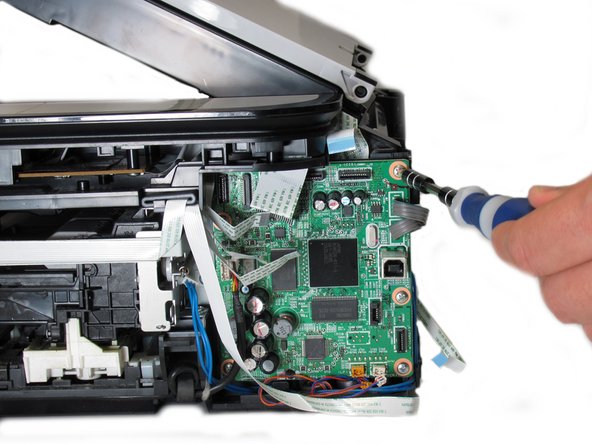
    • Unscrew the five silver Phillips screws that secure the motherboard:

    • Five 3.65mm Phillips #1 screws.

    Pregunta a FixBot

    Agregar Comentario

  11. Canon Pixma MP480 Motherboard Replacement: paso 11, imagen 1 de 2 Canon Pixma MP480 Motherboard Replacement: paso 11, imagen 2 de 2
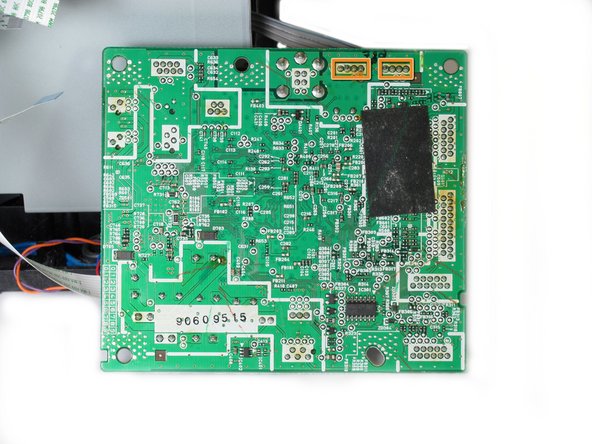
    • Once all wires and screws have been removed, gently take the motherboard out of the printer.

    • These wires are soldered onto the bottom of the PCB and must be de-soldered in order to completely detach the motherboard from the printer.

    • If you do not know how to operate a soldering iron, do not attempt to finish this guide.

    • De-solder these eight solder joints on the bottom of the motherboard.

    • When reinstalling the motherboard back into the printer, solder the highlighted joints (in orange markers in the second photo) back onto the board.

    Pregunta a FixBot

    Agregar Comentario

Conclusión

Congratulations on successfully removing the motherboard from the printer! To reassemble the motherboard, follow these instructions in reverse order.

Cancelar: No complete esta guía.

3 personas más completaron esta guía.

Equipo

Cal Poly, Team 19-41, Regan Winter 2013 Miembro de Cal Poly, Team 19-41, Regan Winter 2013

CPSU-REGAN-W13S19G41

Miembros de 4

6 Guías creadas

0Guía Comentarios

Agregar Comentario

Ver Estadísticas:

Ultimas 24 horas: 2

Ultimos 7 días: 15

Ultimos 30 días: 59

Todo El Tiempo: 5,739