Saltar al contenido principal
Únete a la Comunidad de Reparación - Crear Cuenta

Canon ImageCLASS MF4350d Scanner Belt Replacement

Qué necesitas

    1. Canon ImageCLASS MF4350d Scanner Belt Replacement, Scanner Disassembly: paso 1, imagen 1 de 1
      • If at any point you see glass that seems cracked or broken, handle with care. Broken glass is sharp and can cause serious damage.

      • Lift up the lid. Then be sure to examine the glass. If there are any cracks or broken fragments handle with extreme care.

      Pregunta a FixBot

      Agregar Comentario

    2. Canon ImageCLASS MF4350d Scanner Belt Replacement: paso 2, imagen 1 de 3 Canon ImageCLASS MF4350d Scanner Belt Replacement: paso 2, imagen 2 de 3 Canon ImageCLASS MF4350d Scanner Belt Replacement: paso 2, imagen 3 de 3
      • Locate the black and white hinges.

      • Gently lift out the black and white hinges.

      Pregunta a FixBot

      Agregar Comentario

    3. Canon ImageCLASS MF4350d Scanner Belt Replacement: paso 3, imagen 1 de 3 Canon ImageCLASS MF4350d Scanner Belt Replacement: paso 3, imagen 2 de 3 Canon ImageCLASS MF4350d Scanner Belt Replacement: paso 3, imagen 3 de 3
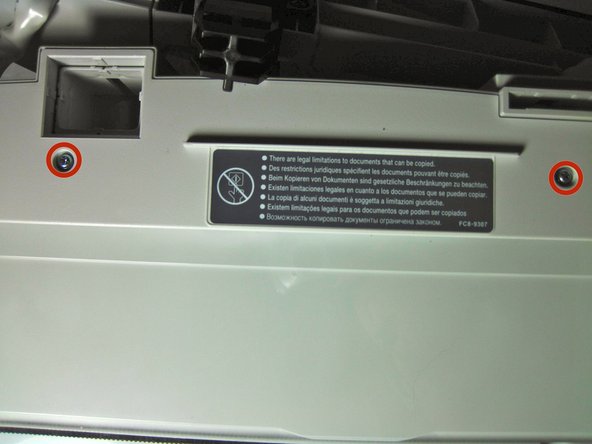
      • Next, locate and remove the four 10mm screws.

      Pregunta a FixBot

      Agregar Comentario

    4. Canon ImageCLASS MF4350d Scanner Belt Replacement: paso 4, imagen 1 de 1
      • Gently, pry off the top plate, starting from the back of the printer.

      Pregunta a FixBot

      Agregar Comentario

    5. Canon ImageCLASS MF4350d Scanner Belt Replacement: paso 5, imagen 1 de 2 Canon ImageCLASS MF4350d Scanner Belt Replacement: paso 5, imagen 2 de 2
      • After you have taken off the plate, check to make sure that there is no broken glass. If there is broken glass handle it with gloves. Broken glass, if handled improperly, can cause physical injury.

      Pregunta a FixBot

      Agregar Comentario

    1. Canon ImageCLASS MF4350d Scanner Belt Replacement, Scanner Belt: paso 6, imagen 1 de 2 Canon ImageCLASS MF4350d Scanner Belt Replacement, Scanner Belt: paso 6, imagen 2 de 2
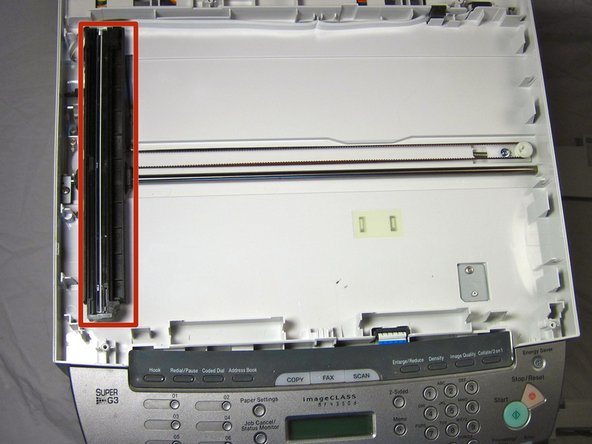
      • Remove the black component by gently pulling it up from the black scanner belt

      Pregunta a FixBot

      Agregar Comentario

    2. Canon ImageCLASS MF4350d Scanner Belt Replacement: paso 7, imagen 1 de 2 Canon ImageCLASS MF4350d Scanner Belt Replacement: paso 7, imagen 2 de 2
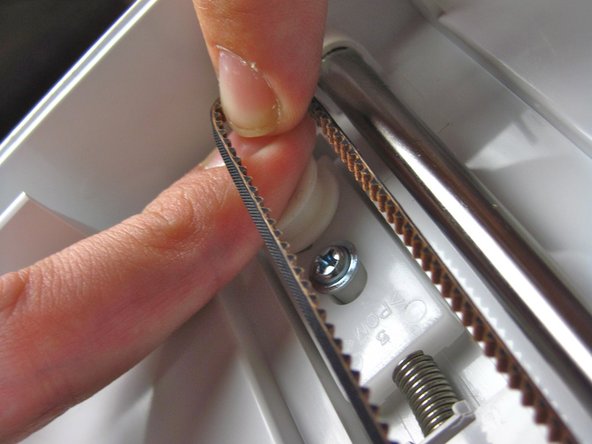
      • Press down on the white release and force it in toward the spring as shown. While you do this, pull the scanner belt out of the track.

      • Take a new belt and put it in the same way that you took it out.

      Pregunta a FixBot

      Agregar Comentario

Conclusión

To reassemble your device, follow these instructions in reverse order.

Cancelar: No complete esta guía.

Equipo

Cal Poly, Team 13-1, Forte Fall 2013 Miembro de Cal Poly, Team 13-1, Forte Fall 2013

CPSU-FORTE-F13S13G1

Miembros de 5

96 Guías creadas

0Guía Comentarios

Agregar Comentario

Ver Estadísticas:

Ultimas 24 horas: 2

Ultimos 7 días: 12

Ultimos 30 días: 40

Todo El Tiempo: 3,739