Saltar al contenido principal
Únete a la Comunidad de Reparación - Crear Cuenta

Canon EOS Rebel XS Strap Loops Replacement

Qué necesitas

    1. Canon EOS Rebel XS Strap Loops Replacement, Eyepiece: paso 1, imagen 1 de 2 Canon EOS Rebel XS Strap Loops Replacement, Eyepiece: paso 1, imagen 2 de 2
      • Grasp the eyepiece with your fingers and slide upwards to remove it.

      Pregunta a FixBot

      Agregar Comentario

    1. Canon EOS Rebel XS Strap Loops Replacement, Top Cover: paso 2, imagen 1 de 2 Canon EOS Rebel XS Strap Loops Replacement, Top Cover: paso 2, imagen 2 de 2
      • Using a PH000 screwdriver bit, remove the three black screws shown in the two pictures that are all 4 mm in length and 1 mm in diameter.

      Pregunta a FixBot

      Agregar Comentario

    2. Canon EOS Rebel XS Strap Loops Replacement: paso 3, imagen 1 de 1
      • Using a Phillips #000 screwdriver, remove the two black screws shown in the picture that are both 6 mm in length and 1.25 mm in diameter.

      Pregunta a FixBot

      Agregar Comentario

    3. Canon EOS Rebel XS Strap Loops Replacement: paso 4, imagen 1 de 1
      • Pull off the front cover.

      Pregunta a FixBot

      Agregar Comentario

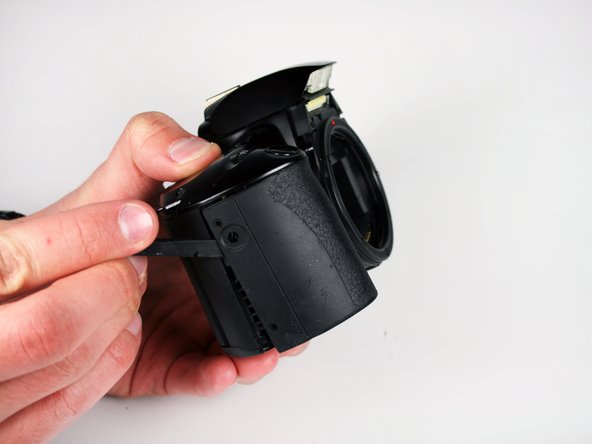
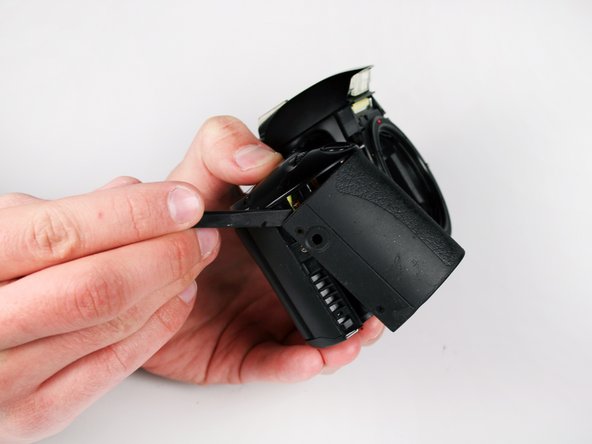
    4. Canon EOS Rebel XS Strap Loops Replacement: paso 5, imagen 1 de 3 Canon EOS Rebel XS Strap Loops Replacement: paso 5, imagen 2 de 3 Canon EOS Rebel XS Strap Loops Replacement: paso 5, imagen 3 de 3
      • Using an opening tool (you can also use your nails, but try not to use something potentially damaging to the camera such as metal), separate the top cover from the rest of the camera!

      Pregunta a FixBot

      Agregar Comentario

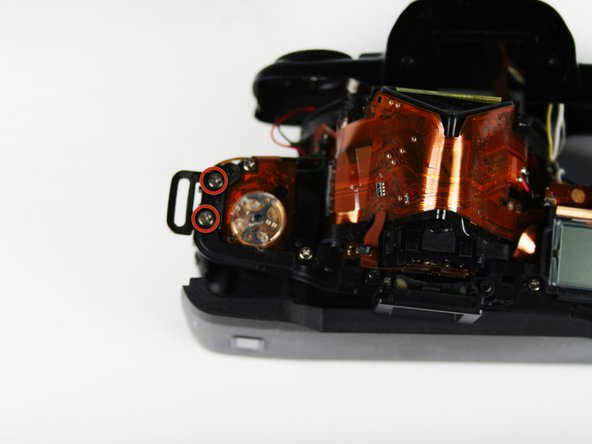
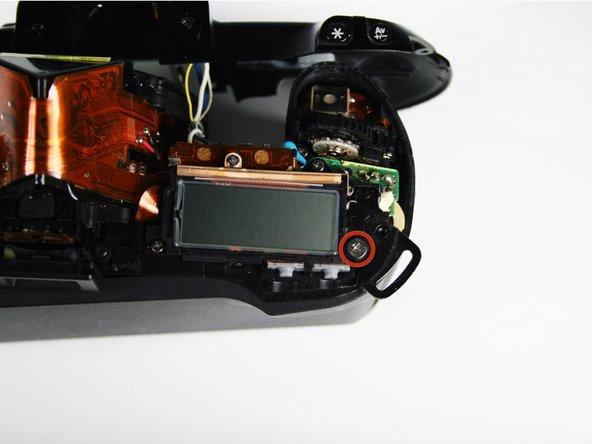
    1. Canon EOS Rebel XS Strap Loops Replacement, Strap Loops: paso 6, imagen 1 de 3 Canon EOS Rebel XS Strap Loops Replacement, Strap Loops: paso 6, imagen 2 de 3 Canon EOS Rebel XS Strap Loops Replacement, Strap Loops: paso 6, imagen 3 de 3
      • Remove the two 5.0mm (.20in) silver screws from the first loop hole using a #00 Phillips screwdriver (Picture Two).

      • Remove the 6.8mm (.27in) wide head silver screw from the second loop hole using a #00 Phillips screwdriver (Picture Three).

      Pregunta a FixBot

      Agregar Comentario

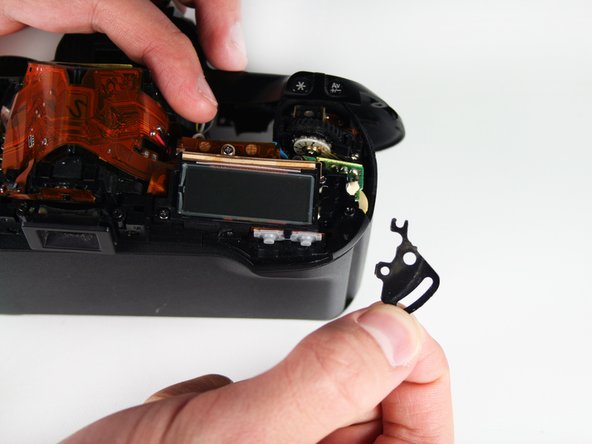
    2. Canon EOS Rebel XS Strap Loops Replacement: paso 7, imagen 1 de 2 Canon EOS Rebel XS Strap Loops Replacement: paso 7, imagen 2 de 2
      • Use your fingers to remove the loop holes.

      Pregunta a FixBot

      Agregar Comentario

Conclusión

To reassemble your device, follow these instructions in reverse order.

Cancelar: No complete esta guía.

Daniel Bussone

Miembro Desde 01/28/11

1,289 Reputación

11 Guías creadas

Equipo

Cal Poly, Team 3-41, Regan Winter 2011 Miembro de Cal Poly, Team 3-41, Regan Winter 2011

CPSU-REGAN-W11S3G41

Miembros de 2

132 Guías creadas

0Guía Comentarios

Agregar Comentario

Ver Estadísticas:

Ultimas 24 horas: 2

Ultimos 7 días: 27

Ultimos 30 días: 50

Todo El Tiempo: 1,379