Saltar al contenido principal
Únete a la Comunidad de Reparación - Crear Cuenta

Canon EOS Rebel XS 35mm Back Latch Replacement

Qué necesitas

    1. Canon EOS Rebel XS 35mm Back Latch Replacement, Bottom Cover: paso 1, imagen 1 de 1
      • Use a Phillips #000 screwdriver to remove the 7 mm screw.

      • Use a Phillips #000 screwdriver to remove the five 4 mm screws.

      Pregunta a FixBot

      Agregar Comentario

    2. Canon EOS Rebel XS 35mm Back Latch Replacement: paso 2, imagen 1 de 1
      • With your fingers, push on the bottom cover towards the back of the camera until it clicks and separates.

      Pregunta a FixBot

      Agregar Comentario

    3. Canon EOS Rebel XS 35mm Back Latch Replacement: paso 3, imagen 1 de 1
      • Using tweezers or your fingers, carefully remove the five gears and set them aside temporarily.

      • These gears can fall out easily while you’re working, so keeping them organized will help prevent loss.

      Pregunta a FixBot

      Agregar Comentario

    1. Canon EOS Rebel XS 35mm Back Latch Replacement, Top Cover: paso 4, imagen 1 de 2 Canon EOS Rebel XS 35mm Back Latch Replacement, Top Cover: paso 4, imagen 2 de 2
      • Using a PH000 screwdriver bit, remove the three black screws shown in the two pictures that are all 4 mm in length and 1 mm in diameter.

      Pregunta a FixBot

      Agregar Comentario

    2. Canon EOS Rebel XS 35mm Back Latch Replacement: paso 5, imagen 1 de 1
      • Using a Phillips #000 screwdriver, remove the two black screws shown in the picture that are both 6 mm in length and 1.25 mm in diameter.

      Pregunta a FixBot

      Agregar Comentario

    3. Canon EOS Rebel XS 35mm Back Latch Replacement: paso 6, imagen 1 de 1
      • Pull off the front cover.

      Pregunta a FixBot

      Agregar Comentario

    4. Canon EOS Rebel XS 35mm Back Latch Replacement: paso 7, imagen 1 de 3 Canon EOS Rebel XS 35mm Back Latch Replacement: paso 7, imagen 2 de 3 Canon EOS Rebel XS 35mm Back Latch Replacement: paso 7, imagen 3 de 3
      • Using an opening tool (you can also use your nails, but try not to use something potentially damaging to the camera such as metal), separate the top cover from the rest of the camera!

      Pregunta a FixBot

      Agregar Comentario

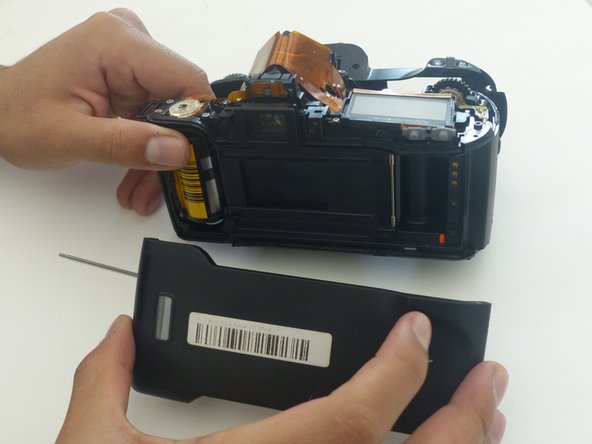
    1. Canon EOS Rebel XS 35mm Back Latch Replacement, Back Latch: paso 8, imagen 1 de 1
      • Once the front, top, and bottom covers have all been removed, it's time to remove the back latch! Using a paperclip or something similar (anything that's very skinny), push on the end of the skinny, silver, metal rod that vertically travels through the camera. Do this until enough of the rod pops out on the other side for the next step.

      Pregunta a FixBot

      Agregar Comentario

    2. Canon EOS Rebel XS 35mm Back Latch Replacement: paso 9, imagen 1 de 1
      • Remove the screw with a Phillips #00 screwdriver.

      • Remove the screw with a Phillips #000 screwdriver.

      Pregunta a FixBot

      Agregar Comentario

    3. Canon EOS Rebel XS 35mm Back Latch Replacement: paso 10, imagen 1 de 2 Canon EOS Rebel XS 35mm Back Latch Replacement: paso 10, imagen 2 de 2
      • Remove the side piece to open the latch.

      • Carefully hold the camera around and not on the camera sensor.

      Pregunta a FixBot

      Agregar Comentario

    4. Canon EOS Rebel XS 35mm Back Latch Replacement: paso 11, imagen 1 de 2 Canon EOS Rebel XS 35mm Back Latch Replacement: paso 11, imagen 2 de 2
      Herramienta utilizada en este paso:
      Tweezers
      $4.99
      • With a pair of tweezers or just your fingers, pull the rod completely out of the camera. The back latch should then completely detach from the camera.

      Pregunta a FixBot

      Agregar Comentario

Conclusión

To reassemble your device, follow these instructions in reverse order.

Cancelar: No complete esta guía.

christiansvezia

Miembro Desde 10/24/18

1,136 Reputación

10 Guías creadas

1Guía Comentario

This would be fantastic if only you'd noted a place to obtain a replacement latch from.

David Sanborn - Contestar Compartir

Agregar Comentario

Ver Estadísticas:

Ultimas 24 horas: 1

Ultimos 7 días: 11

Ultimos 30 días: 56

Todo El Tiempo: 1,576