Introducción
Use this guide to replace a cracked or malfunctioning rear LCD screen on your EOS 6D.
Qué necesitas
-
-
Remove the viewfinder cover by pinching the sides and sliding it upward.
-
-
-
Herramienta utilizada en este paso:Tweezers$4.99
-
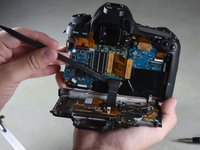
Detach the two light brown ribbon wires from the back of the LCD screen by firmly gripping each with tweezers and gently pulling straight to the left.
-





To reassemble your device, follow these instructions in reverse order.
Cancelar: No complete esta guía.
12 personas más completaron esta guía.



Equipo

Cal Poly, Team 11-48, Amido Spring 2014 Miembro de Cal Poly, Team 11-48, Amido Spring 2014
CPSU-AMIDO-S14S11G48
Miembros de 4
18 Guías creadas
5Guía Comentarios
Thank you! Thank you!! I rescued my 6D. All your steps and details were very useful.
Few points to add:
1. I think the black screw (yellow circle) from step 7 is 3 mm.
2. Lift the light brown flap that holds the ribbon cable before removing the LCD panel.
3. When you remove the LCD panel from the metal housing, you will have to pry the two strips of adhesive that is there.
4. Be careful when tightening the screws back.
