Saltar al contenido principal
Únete a la Comunidad de Reparación - Crear Cuenta

Apple AirPort Extreme Model A1034 USB Port Replacement

Qué necesitas

    1. Apple AirPort Extreme Model A1034 USB Port Replacement, Outer Case: paso 1, imagen 1 de 1
      • Remove the three 14.3mm T7 Torx screws from the bottom of AirPort.

      Pregunta a FixBot

      Agregar Comentario

    2. Apple AirPort Extreme Model A1034 USB Port Replacement: paso 2, imagen 1 de 1
      • Remove the 5.1mm Phillips screw from the bottom of the AirPort. This screw is located under the identification sticker. You will have to remove the sticker or make a hole to remove it.

      Pregunta a FixBot

      Agregar Comentario

    3. Apple AirPort Extreme Model A1034 USB Port Replacement: paso 3, imagen 1 de 2 Apple AirPort Extreme Model A1034 USB Port Replacement: paso 3, imagen 2 de 2
      • Lift the bottom and top casing straight apart and then lift metal casing straight up from the bottom plastic casing.

      Pregunta a FixBot

      Agregar Comentario

    4. Apple AirPort Extreme Model A1034 USB Port Replacement: paso 4, imagen 1 de 1
      • Unplug the black connector on the top of the metal casing by gently pulling horizontally.

      Pregunta a FixBot

      Agregar Comentario

    1. Apple AirPort Extreme Model A1034 USB Port Replacement, Motherboard: paso 5, imagen 1 de 1
      • Remove the four 4.3mm phillips screws from the bottom of the metal casing.

      Pregunta a FixBot

      Agregar Comentario

    2. Apple AirPort Extreme Model A1034 USB Port Replacement: paso 6, imagen 1 de 1
      • Lift and separate the top and bottom of the metal casing. You will now expose the motherboard and the AirPort card.

      • To remove the AirPort card, gently pull the plastic tab horizontally.

      Pregunta a FixBot

      Agregar Comentario

    3. Apple AirPort Extreme Model A1034 USB Port Replacement: paso 7, imagen 1 de 1
      • Locate and remove the three 5.0mm phillips screws from the heat sink.

      • Lift to remove the heat sink from the motherboard.

      Pregunta a FixBot

      Agregar Comentario

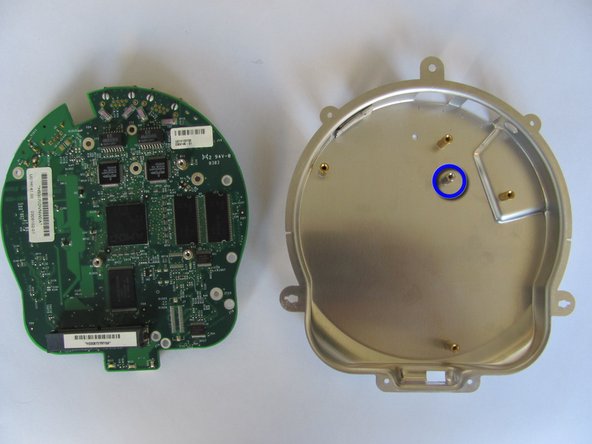
    4. Apple AirPort Extreme Model A1034 USB Port Replacement: paso 8, imagen 1 de 2 Apple AirPort Extreme Model A1034 USB Port Replacement: paso 8, imagen 2 de 2
      • Locate and remove the five 7.5mm phillips screws from the motherboard.

      • Lift and separate the motherboard from the bottom metal casing.

      • There will be a loose hexagonal female screw extender under the motherboard.

      Pregunta a FixBot

      Agregar Comentario

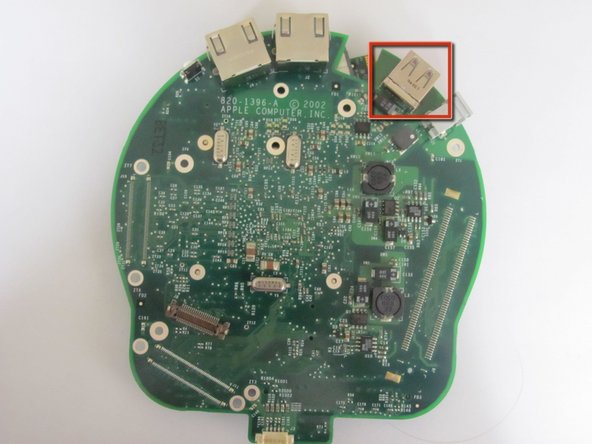
    1. Apple AirPort Extreme Model A1034 USB Port Replacement, USB Port: paso 9, imagen 1 de 2 Apple AirPort Extreme Model A1034 USB Port Replacement, USB Port: paso 9, imagen 2 de 2
      Pregunta a FixBot

      Agregar Comentario

Conclusión

To reassemble your device, follow these instructions in reverse order.

Cancelar: No complete esta guía.

2 personas más completaron esta guía.

Equipo

Cal Poly, Team 17-15, Regan Fall 2011 Miembro de Cal Poly, Team 17-15, Regan Fall 2011

CPSU-REGAN-F11S17G15

Miembros de 3

84 Guías creadas

0Guía Comentarios

Agregar Comentario

Ver Estadísticas:

Ultimas 24 horas: 12

Ultimos 7 días: 29

Ultimos 30 días: 49

Todo El Tiempo: 3,705