
Acer Aspire 4741G-332G32Mn Motherboard Replacement

Última actualización: 16 de may. de 2022
Vistas: 2.1 k
Ver estadísticas:
- Últimas 24 horas:
- 5
- Últimos 7 días:
- 18
- Últimos 30 días:
- 75
- Todo El Tiempo:
- 2,118
Comentarios: 1
1 comentario sobre los pasos.
Completado: 0 1
Nadie ha marcado esta guía como "completada". ¿Quieres marcarla tú?
1 persona acaba de marcar esta guía como "completada". ¡Has sido tú, excelente trabajo!
Favoritos: 0 1
Nadie ha marcado como "Favorita" ni se ha suscrito a esta guía. ¿Quieres hacerlo tú?
1 persona marcó (y se suscribió) a esta guía como favorita, ¡y ese eres tú!
Fotos de acción
Sé un héroe de acción! Esta guía necesita imágenes que demuestren mejor cómo llevar a cabo acciones específicas.
Necesita mejores imágenes
Mejores fotos mejorarán esta guía. Ayuda tomando, editando o subiendo nuevas imágenes!
Introducción
Ir al paso 1 ↓This guide will walk you through how to replace the motherboard of your Acer Aspire 5451G-332G32Mn Laptop.
This replacement may be needed for a multitude of reasons, such as heat damage, power surge/spike, or spills / water damage.
The motherboard is responsible for allowing all of the hardware in your laptop to communicate, so if you are experiencing the blue screen of death, missing or unusable devices, or if your laptop is just not turning on then this may fix the problem.
No special skills are required, though caution should be taken as many of the components in this tear down are fragile to both force, electricity, and water. The majority of this replacement is just removing the screws which hold the laptop panels and motherboard in place. Be sure to power off your device and unplug it from the power adapter.
Qué necesitas
Partes
Herramientas


-
-
-
-
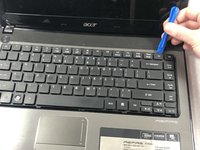
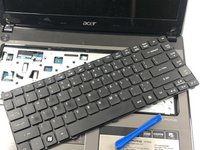
Pry off the keyboard using the opening tool.
-
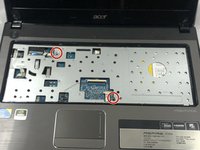
Remove the two screws that are connected to the motherboard using a Phillips #0 screwdriver.
-
-
-
-
Remove all 12 screws from the backplate using a Phillips #0 screwdriver.
-
-
-
-
-
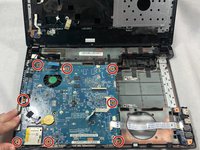
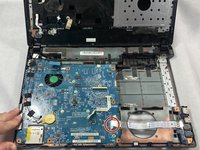
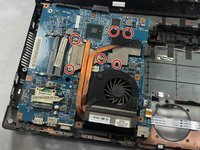
Using a Phillips #0 screwdriver, remove the eight screws that hold the motherboard to the frame of the laptop.
-
Disconnect the USB port from the motherboard.
-
-
-
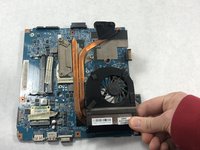
Unscrew the 6 screws that hold the fan to the motherboard using the same screwdriver.
-
-
-

 Pregunta a FixBot







To reassemble your device, follow these instructions in reverse order.

Equipo

UMass Dartmouth, Team S2-G6, Simcock Spring 2019 Miembro de UMass Dartmouth, Team S2-G6, Simcock Spring 2019
UMASSD-SIMCOCK-S19S2G6
Miembros de 4
96 Guías creadas
